StartCleaner

StartCleaner is a free Windows startup manager that gathers autorun items into one list and disables them instead of deleting them.
Version: 2.0.3| Developer | KILHO.NET |
|---|---|
| Version | 2.0.3 |
| License | Freeware |
| Operating system | Windows |
| Interface languages | English, Korean, Japanese, French |
| File size | 1.9 MB |
| Ads / bundled offers | None |
| Last updated | 2026-11-05 |
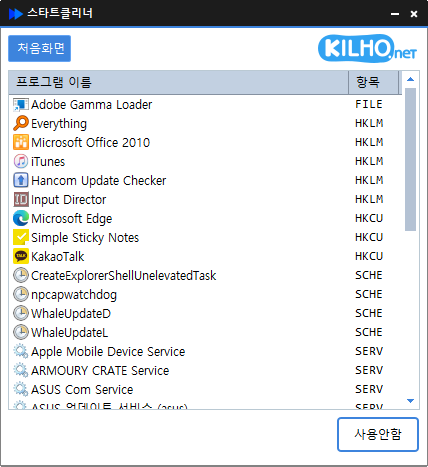
StartCleaner is a free Windows startup manager from KILHO.NET. Programs that launch automatically at boot or sign-in can be registered in four different places: the Startup folder, the registry Run keys, Task Scheduler and Windows services. StartCleaner collects all four into a single list and shows where each entry comes from in a Source column. Rather than deleting entries, it disables them, so anything switched off by mistake can simply be switched back on.
It suits users whose PC slows down after sign-in because messengers and updaters start with Windows, and anyone who wants to review scheduled tasks and services that never appear in Task Manager's Startup apps tab. Both an installer and a portable ZIP are offered, so it can also run from a USB stick. On the other hand, it runs only on 64-bit Windows 10 and 11 and needs administrator rights, so it is not an option on 32-bit systems or on locked-down work PCs without admin access.
Startup folder entries (all users and current user), registry entries (HKLM and HKCU), root-level Task Scheduler tasks and automatically starting services appear in one view. Each row shows the product name and icon stored in the program file rather than a bare file name. Press F5 to refresh the list after installing new software.
Startup folder and registry items receive the same Disabled mark that Task Manager uses, while the shortcut file and registry value stay in place. Scheduled tasks are disabled as tasks, and services have their startup type set to Disabled. Every change can be reversed with the Enable button.
Services and tasks that Windows needs for audio, networking, security and similar functions are hidden from the list by default. The hidden list is refreshed online when a connection is available, and a built-in copy is used offline. This reduces the risk of switching off something the system depends on.
Autorun entries left behind by uninstalled programs can be removed: disable the row first, then choose Delete from the right-click menu. Deletion is allowed only for disabled items, the confirmation dialog defaults to No, and deleted entries cannot be restored.
Double-clicking an unfamiliar entry opens an information page about it in the browser. Save List exports every item, including the hidden Windows entries, to a text file in source|name|target format, which is useful as a record before making changes.
StartCleaner covers all four autorun locations and adds enable/disable, leftover deletion and list export, which is everything a startup manager needs. Handling scheduled tasks and services alongside ordinary startup apps is what sets it apart from Task Manager.
There is no settings screen; selecting an entry and pressing Disable or Enable is all it takes, so new users pick it up immediately. The interface follows the Windows display language and falls back to English. One caveat is that re-enabling a service always sets it to Automatic, even if it was originally Manual, so dimmed Manual services are best left alone.
It is freeware with no ads or bundled offers, and it uses the internet only for new-version notices and the hidden-items list. It never updates itself; it announces a new version and opens the download page if the user agrees. Version 2.0.1 was rewritten in Rust, and 2.0.3 (October 26, 2026) continued the stability fixes.
| Operating system | Windows |
|---|---|
| Requirements | Windows 10/11 (64-bit) |
Yes. StartCleaner is freeware that may be used at home, at work, in schools and in public offices, and it may be redistributed freely.
No. Disabling only stops the automatic launch; the program, its shortcut and its registry value remain, and the item can be re-enabled at any time.
Changing all-user startup items, services and scheduled tasks requires administrator rights. Windows asks for permission when the program starts.
Yes. Extract the portable ZIP and run StartCleaner.exe; it has the same features as the installed version.
Tick the All Programs checkbox so disabled items appear as dimmed rows, select the row and press Enable.
StartCleaner is a sound choice for Windows 10 and 11 users who want to trim what launches at sign-in without risking permanent changes. Its single list across four autorun locations, reversible disabling and free business use earn it our editor rating of 5 out of 5.
Editor rating 5/5