SecretDNS

SecretDNS is a free Windows tool that bypasses DPI eavesdropping with DNS over HTTPS and SNI fragmentation.
Version: 4.1.2| Developer | KILHO.NET |
|---|---|
| Version | 4.1.2 |
| License | Freeware |
| Operating system | Windows, macOS |
| Interface languages | English, Korean, Japanese, German, French |
| File size | 2.7 MB |
| Ads / bundled offers | None |
| Last updated | 2026-11-05 |
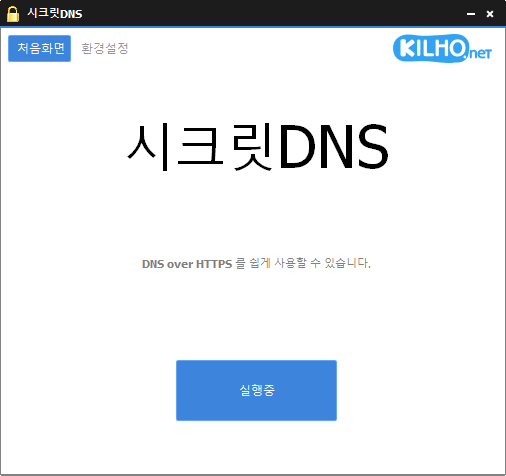
SecretDNS is a free DPI bypass tool for Windows developed by KILHO.NET. When you open a website, your computer sends two pieces of information in plain text: the DNS query asking for the site's IP address, and the site name (SNI) in the first packet of every HTTPS connection. Deep packet inspection (DPI) equipment run by ISPs or network administrators reads both to block connections or redirect them to warning pages. SecretDNS encrypts DNS queries with DNS over HTTPS (DoH) and splits the SNI into fragments, closing both gaps.
It suits users who want encrypted DNS and SNI bypass switched on together with a single button and no configuration. Because it never edits the network adapter's DNS settings, stopping the program—or rebooting after a forced shutdown—returns everything to normal. It is not a VPN, however: it does not hide your IP address or encrypt all traffic, and anyone using it at work or school should follow the organization's network policy.
DNS queries are encrypted and sent to a DoH server such as Cloudflare. You can add your own servers and select several, and SecretDNS fails over automatically when one stops answering. A Servers mode uses plain DNS such as 1.1.1.1 without encryption.
In HTTPS and HTTP connections, only the part carrying the site name is fragmented so inspection equipment cannot read it. Since nothing else is touched, the speed impact is minimal. A Fake Packet option adds another bypass method for networks where fragmentation alone is not enough.
About 160 domains that break when fragmented, such as banks, payment gateways and government sites, are built in as exceptions. Alternatively, the manual list mode (Fragmentⓜ) applies the bypass only to sites you name. The Browsers only option, on by default, limits it to browsers such as Chrome, Edge, Firefox and Whale so games and business software are left alone.
Sites that DNS bypass cannot open—for example those returning error 451 because the site itself refuses connections from your country—can be routed through an overseas server. Only the domains you list take that route, so the rest of your connection keeps full speed.
A separate window lists each domain and what was applied to its DNS and SNI traffic, such as encrypted, fragmented, plaintext or via server. The table can be copied to the clipboard for troubleshooting.
SecretDNS checks that the DNS server is reachable before starting, keeps the internet working if the server stops answering, and resumes encryption once it returns. Connectivity also survives sleep and Wi-Fi changes.
DoH, SNI fragmentation, fake packets, exception lists and Mixed Proxy put every common DPI bypass method in a single program. The per-site report makes it easy to see why a particular site fails to load.
Pressing the lock button on the home screen turns it on, and the tray icon toggles it as well. The interface is available in 22 languages; settings are locked while it runs, so it must be stopped before options can be changed.
There are no ads or bundled offers, and because Windows network settings are never modified, nothing is left behind. For security and to avoid false antivirus alerts, it shows a new-version notice at startup instead of updating automatically, and updates continue, with 4.1.2 released on October 31, 2026.
| Operating system | Windows, macOS |
|---|---|
| Requirements | Windows 7 / 8.1 / 10 / 11 (32/64-bit) |
Yes. SecretDNS is freeware that can be used without restriction at work, home, government offices or schools, and it may be redistributed freely.
A VPN routes all traffic through another server and changes your IP address, whereas SecretDNS handles only DNS and SNI. As a result it barely affects speed, but it does not hide your IP address.
Hardly at all. Only the part of the connection that carries the site name is fragmented, and all other data is sent unchanged.
No. It never edits the network adapter's DNS settings, so stopping it, or rebooting after a forced shutdown, leaves the system exactly as before.
Yes. Since version 4.1.2 it supports Windows 7, 8.1 and older builds of Windows 10, on both 32-bit and 64-bit systems.
SecretDNS is a recommended free tool for Windows users who want to get around DNS eavesdropping and SNI-based blocking without any setup. Its one-click operation, design that leaves Windows settings untouched and license that allows business use earn it our editor rating of 5 out of 5.
Editor rating 5/5

 English
 한국어
 日本語
 Deutsch
 Français
 Español
 Italiano
 Nederlands
 Svenska
 Dansk
 Norsk